Instructor Guide
Instructor Dashboard
The instructor dashboard gives you a quick overview of your classes, exams, and grading workload.
Who can access this? Instructor
Dashboard Overview
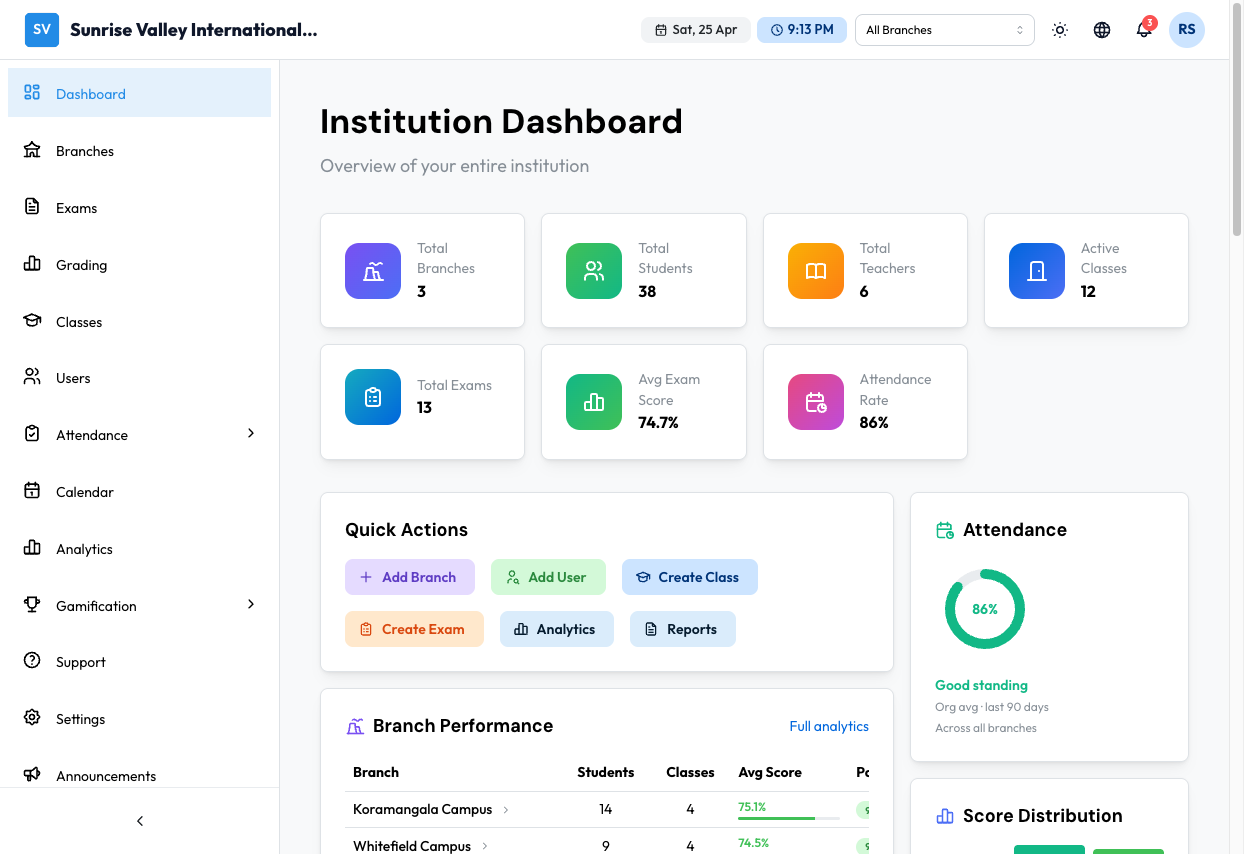
Stats Cards
| Stat | Description |
|---|---|
| Total Students | Students across all your classes |
| Total Teachers | Number of teachers in the organization |
| Active Classes | Classes currently active |
| Total Exams | Exams created in the organization |
| Avg Exam Score | Average score across graded exams |
| Attendance Rate | Organization-wide attendance rate |
Quick Actions
Quick-access buttons for common tasks:
- Add User — Navigate to user creation
- Create Class — Open class creation wizard
- Create Exam — Open exam creation wizard
- Analytics — Jump to analytics dashboard
- Reports — Jump to reports
Branch Performance
Table comparing all branches with:
- Branch name
- Students, Classes, Avg Score, Pass Rate (with progress bars)
- Click a branch row for detailed analytics
Exam Activity
Recent exams with:
- Exam title and status badge
- Attempt count, average score, pass rate
- Progress bar showing score range
Class Performance
Table comparing all classes with:
- Class name and branch
- Students, Avg Score, Pass Rate (with progress bars)
- Click for detailed analytics
Teacher Performance
Table showing all teachers with:
- Teacher name
- Classes, Students, Student Avg, Pass Rate (with progress bars)
Attendance
Organization-wide attendance widget with:
- Attendance percentage
- Standing label
Score Distribution
Chart showing distribution of all graded exam scores with grade ranges (40-60, 60-80, 80-100).
Resource Usage
Shows current plan usage:
- Branches, Students, Instructors, Exams/Month, Storage, Questions
- Progress bars showing usage against plan limits
- Current plan name (e.g., Enterprise)
Announcements
Recent announcements with priority badges and message preview. Click View All for full list.
Upcoming This Week
List of upcoming exams scheduled for the current week.
Recent Activity
Feed of recent user logins and actions with timestamps.
Navigation
From the sidebar, instructors can access:
- Dashboard — Home overview
- Branches — View branch information
- Exams — Manage your exams
- Grading — Review and grade submissions
- Classes — View your assigned classes
- Users — View user accounts
- Attendance — View attendance records
- Calendar — View academic calendar
- Analytics — View performance data
- Gamification — View gamification features
- Support — Create support tickets
- Settings — Manage account settings
- Announcements — View and create announcements
- Upcoming — View upcoming events